Getting Started
Architecture
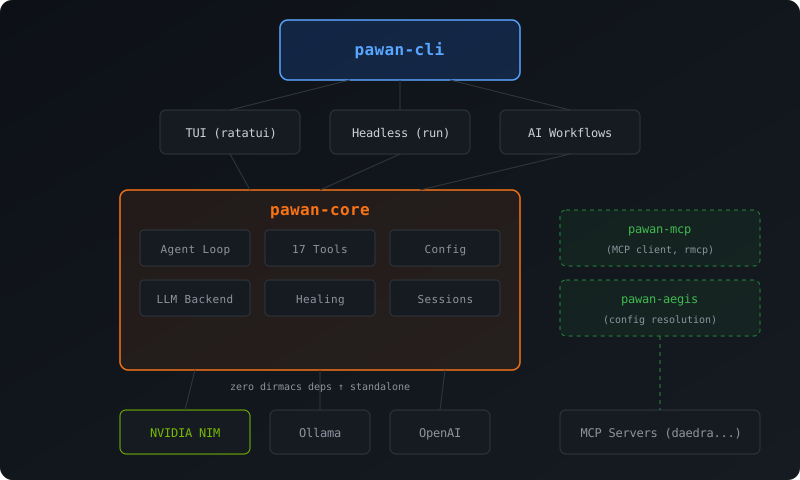
Install
cargo install pawan
Or build from source:
git clone https://github.com/dirmacs/pawan && cd pawan
cargo install --path crates/pawan-cli
Setup
Set your NVIDIA NIM API key (free tier available at build.nvidia.com):
export NVIDIA_API_KEY=nvapi-...
Or create a .env file in your project:
NVIDIA_API_KEY=nvapi-...
Local Inference (Free, Optional)
The mlx provider runs a model locally on Mac via mlx_lm.server. No API key needed, $0/token. Optional — pawan defaults to Qwen3.5 122B on NVIDIA NIM.
The lancor provider runs llama.cpp models locally on any platform (Linux, Mac, Windows). Build with --features lancor and point it at a GGUF model file. No API key, $0/token.
provider = "mlx"
model = "mlx-community/Qwen3.5-9B-OptiQ-4bit"
base_url = "http://localhost:8080/v1"
Verify your setup:
pawan doctor
Initialize a project
cd your-project
pawan init
This creates:
pawan.toml— configuration filePAWAN.md— project context (pawan reads this to understand your codebase).pawan/— local pawan directory
First run
# Interactive TUI
pawan

# Or try a quick task
pawan explain src/main.rs
What's New in v0.5.9
TUI Redesign
- Single-letter slash commands removed —
/c /m /t /s /h /q /e /d /? /ssdeleted; long forms only - Token/ctx widget fix —
stream_options.include_usagefor providers that omit streamed usage by default - Auto-scroll pinned —
usize::MAXsentinel replaces message-index math - Permission popup redesign — rounded border, themed title, padded content, Y/N/A badges
- Tool-call transparency — framed cards, 6-line collapsed / 40-line expanded, footer hints
- Aesthetic redesign — rounded borders, branded
◆ pawantitle, badge-pill role headers, muted timestamps
Motion & value animation
animate-corevalue tweens — rolling token counts (600ms cubic-out), eased ctx% bar (450ms cubic-out), accent-colour fade on/themeswitchestachyonfxcell effects — content reveal, popup sweep-in, status pulse (suppressed undercfg!(test))tui-scrollview— automatic vertical scrollbar replaces manual[%]indicatorratatui-cheesespinner — animated "Pawan is thinking..." replaces static labelRect::centered()— all overlay modals use centered constraints
What's New in v0.5.8
TUI Reliability & Polish
- Slash command submission —
/theme <name>and other argument-bearing slash commands now submit on Enter instead of being intercepted by the inline picker - Readable input placeholder — placeholder styling is theme-aware at startup, after resets, and after theme switches
- Polished bottom status bar — model, tokens, context percentage/bar, iteration, and timestamp are visually separated
- Expanded TUI tests — key-event regressions and Ratatui TestBackend assertions cover
/theme, placeholder styling, and status formatting - Test suite expansion — 60 new tests for 0%-coverage functions (LspTool, InjectionDetector, main helpers, TUI model picker); 1779 total tests passing across 18 suites
Configuration
Priority: CLI flags > environment variables > pawan.toml > defaults
Environment variables
| Variable | Description |
|---|---|
PAWAN_MODEL | Model override (e.g., minimaxai/minimax-m2.5) |
PAWAN_PROVIDER | Provider: nvidia, ollama, openai, mlx, lancor |
PAWAN_TEMPERATURE | Temperature (0.0-2.0) |
PAWAN_MAX_TOKENS | Max output tokens |
PAWAN_MAX_ITERATIONS | Max tool-calling iterations |
pawan.toml
provider = "nvidia"
model = "qwen/qwen3.5-122b-a10b"
temperature = 0.6
max_tokens = 4096
max_tool_iterations = 20
thinking_budget = 0

# Opt-in: use ares-server's LLMClient + tool coordination primitives
# Requires building with --features ares
use_ares_backend = false

# Optional: link to an external skills repository (dstack-style)
# Overridden by PAWAN_SKILLS_REPO env var
skills_repo = "/opt/dirmacs-skills"

[cloud]
provider = "nvidia"
model = "minimaxai/minimax-m2.5"

[eruka]
enabled = true
url = "http://localhost:8081"

# MCP servers are auto-discovered from PATH at startup:
# - eruka-mcp (context memory)
# - daedra (web search)
# - deagle-mcp (code intelligence)
# Explicit entries override auto-discovery.
[mcp.daedra]
command = "daedra"
args = ["serve", "--transport", "stdio", "--quiet"]
Dirmacs stack integration
Pawan is built on top of the dirmacs Rust stack for maximum reuse:
- ares-server: LLM client abstraction, tool coordination, agent primitives (opt-in via
--features ares) - deagle: graph-backed code intelligence — embedded as library deps (
deagle-core+deagle-parse), no external binary needed; 5 tools: search, keyword, sg, stats, map - thulp (thulp-core / thulp-skill-files): typed tool definitions, SKILL.md parsing
- thulp-skills: multi-step skill workflow execution with timeout/retry
- thulp-query: DSL for dynamic tool filtering (
name:git,has:path, etc.) - thulpoff (thulpoff-core / thulpoff-engine): skill distillation, evaluation, refinement from agent sessions
- eruka-mcp: context memory MCP server (auto-discovered)
- daedra: web search MCP server (auto-discovered)
Common workflows
Fix a broken build
pawan heal
AI-powered commit
# Stage all, generate message, confirm, commit
pawan commit -a

# Just preview the message
pawan commit --dry-run

# Skip confirmation
pawan commit -a -y
Code review
# Review all changes
pawan review

# Review only staged changes
pawan review --staged
Continuous healing
# Check every 10 seconds, auto-commit fixes
pawan watch --interval 10 --commit
Headless scripting
# Single prompt
pawan run "add error handling to the config parser"

# From file
pawan run -f task.md --timeout 300 --output json
Skill distillation
Distill completed sessions into reusable SKILL.md files that capture learned patterns:
# Run a task, then distill it
pawan task "set up CI with GitHub Actions"
pawan distill

# Distill a specific session
pawan distill -s abc123 -o ./skills
The generated skill can be loaded by any thulp-compatible agent, creating a learning loop: do the work once, distill it, reuse it.
Permissions
Control which tools require approval:
# In pawan.toml
[permissions]
bash = "prompt"       # ask before shell commands
git_commit = "prompt" # confirm before committing
write_file = "allow"  # auto-allow (default)
In TUI mode, prompt tools show an inline y/n dialog. In headless mode, prompt tools are denied for safety. Read-only bash commands are auto-allowed.