Getting Started
Architecture
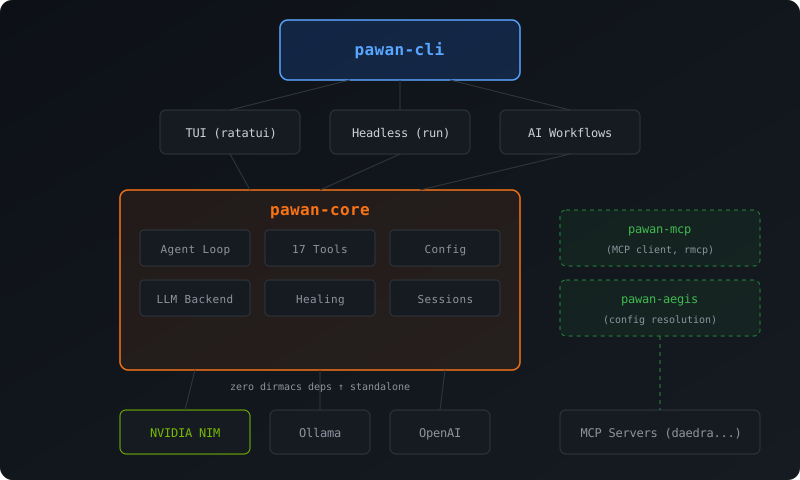
Install
git clone https://github.com/dirmacs/pawan && cd pawan
cargo install --path crates/pawan-cli
Setup
Set your NVIDIA NIM API key (free tier available at build.nvidia.com):
export NVIDIA_API_KEY=nvapi-...
Or create a .env file in your project:
NVIDIA_API_KEY=nvapi-...
Verify your setup:
pawan doctor
Initialize a project
cd your-project
pawan init
This creates:
pawan.toml— configuration filePAWAN.md— project context (pawan reads this to understand your codebase).pawan/— local pawan directory
First run
# Interactive TUI
pawan

# Or try a quick task
pawan explain src/main.rs
Configuration
Priority: CLI flags > environment variables > pawan.toml > defaults
Environment variables
| Variable | Description |
|---|---|
PAWAN_MODEL | Model override (e.g., qwen/qwen3.5-397b-a17b) |
PAWAN_PROVIDER | Provider: nvidia, ollama, openai |
PAWAN_TEMPERATURE | Temperature (0.0-2.0) |
PAWAN_MAX_TOKENS | Max output tokens |
PAWAN_MAX_ITERATIONS | Max tool-calling iterations |
pawan.toml
provider = "nvidia"
model = "mistralai/devstral-2-123b-instruct-2512"
temperature = 1.0
max_tokens = 8192
max_tool_iterations = 15

[mcp.daedra]
command = "daedra"
args = ["serve", "--transport", "stdio", "--quiet"]
Common workflows
Fix a broken build
pawan heal
AI-powered commit
# Stage all, generate message, confirm, commit
pawan commit -a

# Just preview the message
pawan commit --dry-run

# Skip confirmation
pawan commit -a -y
Code review
# Review all changes
pawan review

# Review only staged changes
pawan review --staged
Continuous healing
# Check every 10 seconds, auto-commit fixes
pawan watch --interval 10 --commit
Headless scripting
# Single prompt
pawan run "add error handling to the config parser"

# From file
pawan run -f task.md --timeout 300 --output json